
Reviews integration
Google Reviews + CaptiFi
Turn every WiFi login into a Google review request, and manage every review from one AI-assisted inbox. Hardware included, 30-day trial.
Turn every WiFi login into a Google review request, and manage every review from one AI-assisted inbox. Hardware included, 30-day trial.
The Google Reviews integration turns every guest WiFi login into an opportunity to win a public Google review. When a guest signs in to your WiFi through the CaptiFi splash page, they consent to share their details and their visit is recorded. CaptiFi then waits for the delay you set in Ask after, 24 hours by default and adjustable in minutes, hours or days, and asks that guest to rate their visit while it is still fresh in their mind. The request goes by email, and by text message too if you tick Also ask by text message. Only guests who gave contact details and marketing consent are asked, at most once every 90 days per venue, whichever channel asked first.
Every guest gets the same request and the same public links. When their rating meets your Minimum stars for a public review (4 by default), they are sent straight to your Google listing to post publicly. Lower ratings open a private feedback form, and the public review links stay on that form too, so no guest is ever prevented from posting publicly. Each rating and any private feedback reaches you by email at the address in Send private feedback to. Google's rules prohibit selectively asking for reviews; CaptiFi asks everyone the same way, and the private form is an extra step for unhappy guests.
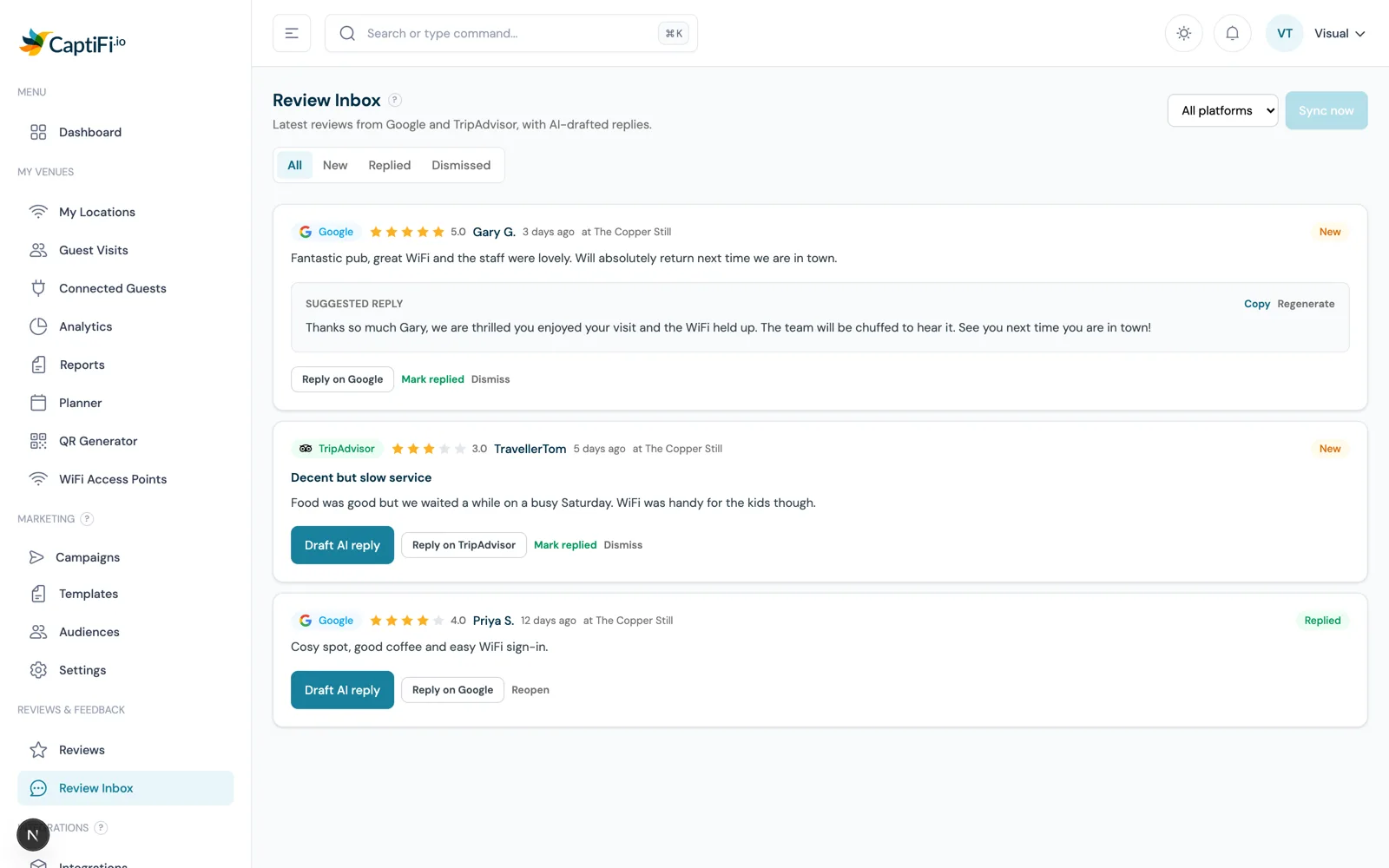
Venues connect Google Reviews because review count and recency are among the strongest signals in local search and on Google Maps. By asking automatically at the right moment, rather than relying on staff to remember, sites typically see a 3 to 5 times increase in monthly reviews within 60 days. The Review Inbox then pulls your latest Google reviews into the dashboard and drafts a suggested reply for each with AI, ready to copy and post. Pair it with the TripAdvisor Reviews and Yelp Reviews integrations to prompt for those platforms from the same flow.
CaptiFi sends a review request to every consented WiFi guest automatically, so you no longer rely on staff remembering to ask. The request lands 24 hours after the visit by default, once the guest has left and while the visit is still fresh, and you can change the delay per venue.
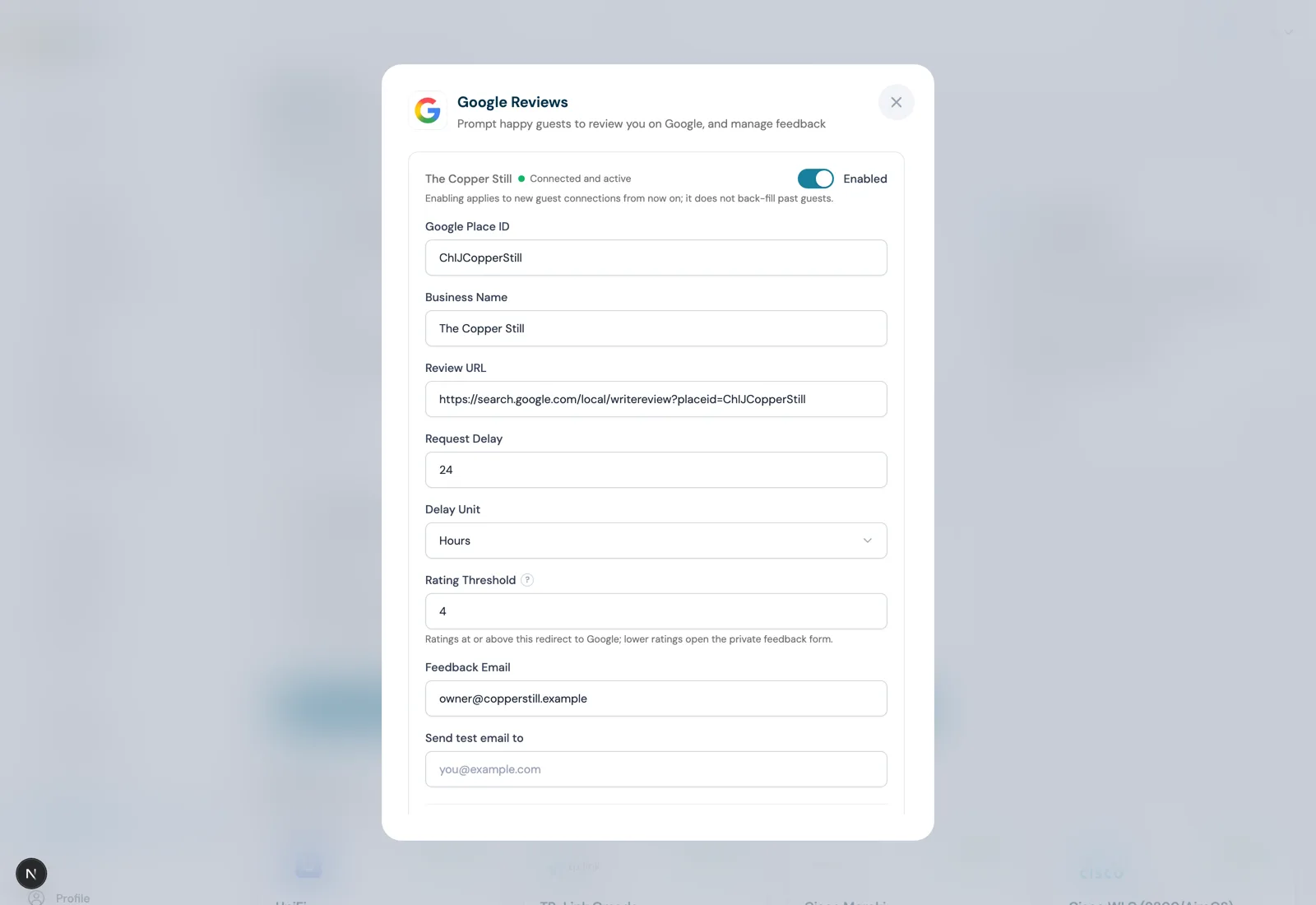
Search your business name and CaptiFi fills in your Google Place ID and review link automatically. No Google account connection, no API keys, and you can set Ask after and Minimum stars for a public review per venue.
Ratings below your minimum open a private feedback form, and every rating and comment is emailed to the address you choose. The form keeps your public review links visible, so every guest remains free to post publicly.
The Review Inbox pulls your latest Google reviews into the dashboard, drafts a suggested reply for each with AI, and deep-links you to the right place to post it. Mark reviews replied or dismissed to keep the queue clear.
Search for your business name on the Google Reviews settings page and CaptiFi fills in your Google Place ID and review link automatically. This is what lets the review request point guests straight to your live Google listing.
The default is 24 hours after the visit, adjustable in minutes, hours or days. Requests go by email; tick Also ask by text message to send the same link by text as well. Texts need SMS Marketing and spend SMS credits, 1 per message segment.
Ratings at or above this number (4 by default) go straight to your Google listing. Lower ratings open the private feedback form, which keeps your public review links visible so every guest can still post publicly. Enter the address for Send private feedback to, where every rating and comment arrives.
Your latest Google reviews sync into the Review Inbox daily. Generate an AI reply draft, copy it, and post it via the deep link, then mark the review replied. Private feedback from lower ratings shows on the Guest feedback tab alongside.
Step by step, with screenshots.
A busy coffee shop captures an email from every guest who joins the WiFi, then automatically asks them for a Google review the next day, growing its review count without staff ever having to interrupt service to ask.
A restaurant sends review requests 24 hours after diners visit. Guests who flag an issue reach the manager through the private feedback form first, with the public review links still one tap away.
A salon ticks Also ask by text message so the request also arrives as a text the day after an appointment, when clients are still enjoying their new look, lifting its monthly Google reviews and pushing it higher in local search.
30-day free trial. Cancel anytime.